
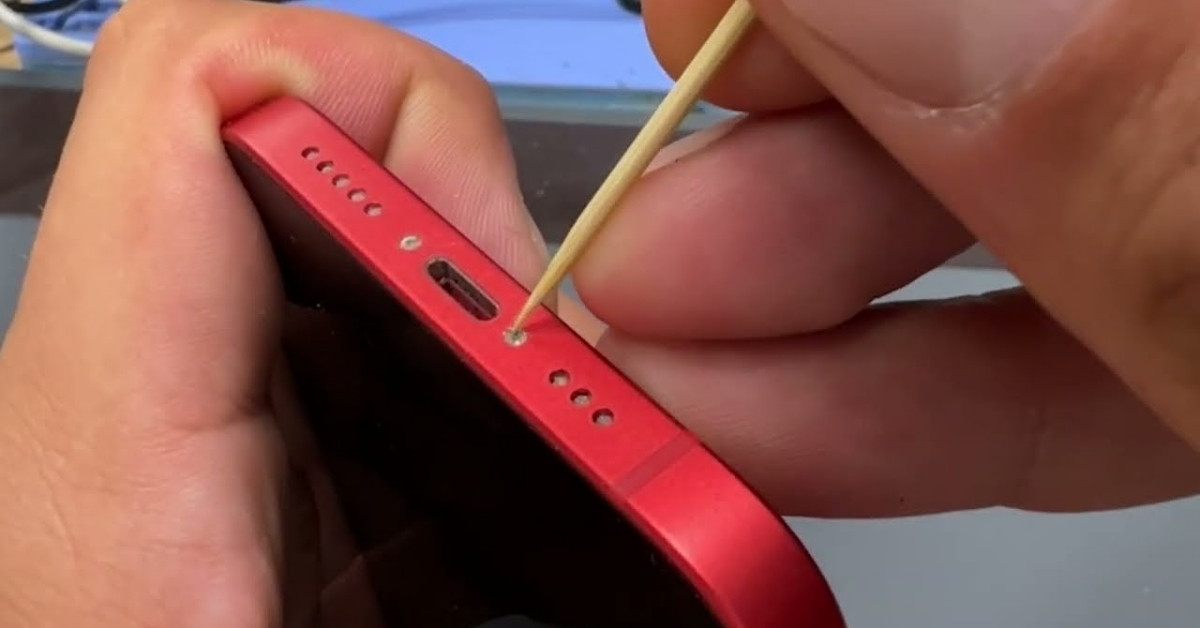
 If your iPhone has stopped charging properly or connects intermittently, the issue may not be the cable or battery—it could be dirt inside the port. This guide explains how to clean iPhone charging port safely and effectively without damaging your device. You’ll learn why debris builds up, how to identify the problem, and the safest tools and methods to use. We’ll also cover common mistakes to avoid, preventive tips, and when professional help is needed. By following this step-by-step approach, you can restore proper charging performance, extend your device’s lifespan, and avoid unnecessary repair costs while maintaining optimal functionality.
Understanding the Problem: Why Your iPhone Charging Port Gets Dirty
The charging port on your iPhone, also known as the Lightning port, is a small but critical component. It connects your device to a power source and enables data transfer. Because of its open design, it easily collects dust, lint, and debris from pockets, bags, and everyday environments.
Over time, this buildup can block the connection between the charging cable and the internal pins. Even a small amount of lint can prevent the cable from sitting properly, leading to slow charging, intermittent charging, or no connection at all.
Common causes of a dirty charging port include:
- Carrying your phone in your pocket frequently
- Exposure to dust, dirt, or sand
- Using the phone in humid or outdoor environments
- Accumulation of fabric fibers from clothing
When debris builds up, you might notice:
- The charging cable feels loose
- Charging stops when you move the phone
- The phone only charges at certain angles
- No charging response at all
Understanding these symptoms is important because they often mimic more serious hardware issues. Before assuming your battery or cable is faulty, checking and cleaning the charging port is a simple and effective first step.
Signs Your iPhone Charging Port Needs Cleaning
Before you begin cleaning, it’s important to confirm that the issue is actually caused by debris in the port. Many users replace cables or even consider repairs when a simple cleaning would solve the problem.
Here are the most common signs that indicate your charging port needs attention:
Physical Indicators
- Visible lint or dust inside the port
- Cable does not fully insert into the port
- Loose or unstable connection
Performance Issues
- Slow or inconsistent charging
- Charging stops with slight movement
- Device not recognized by a computer
Behavioral Clues
- You recently used your phone in a dusty environment
- Your phone spends a lot of time in your pocket
- The issue appeared gradually over time
To better understand the difference between port issues and other problems, consider this table:
| Issue Type | Likely Cause | Solution |
| Loose cable | Debris in port | Clean charging port |
| No charging at all | Damaged cable or port | Test cable, then clean port |
| Slow charging | Dirt or low-quality cable | Clean port, use original cable |
| Intermittent charging | Dust or worn cable | Clean port, replace cable |
This comparison helps you diagnose the issue accurately before taking action. Cleaning is often the quickest and most cost-effective solution.
Tools You Need to Clean an iPhone Charging Port Safely
Cleaning your iPhone charging port requires care and precision. Using the wrong tools can damage the delicate internal connectors, leading to costly repairs.
Below is a list of safe and recommended tools:
Essential Tools
- Wooden toothpick
- Soft, dry brush (like a clean toothbrush)
- Compressed air (used carefully)
- Flashlight for visibility
Optional Tools
- Anti-static brush
- Magnifying glass
- Rubber air blower
Tools to Avoid
It’s equally important to know what NOT to use:
- Metal objects (pins, needles, paperclips)
- Wet cloths or liquids
- Sharp tools that can scratch internal pins
Before you start cleaning, follow these steps:
- Turn off your iPhone completely
- Remove any connected cables
- Work in a well-lit area
- Ensure your hands are clean and dry
Using the right tools ensures that you clean effectively without risking damage. The goal is to remove debris gently rather than forcefully.
Step-by-Step Guide: How to Clean iPhone Charging Port
Cleaning your iPhone charging port is a simple process if done correctly. Follow these steps carefully to avoid damage.
Step 1: Inspect the Port
Use a flashlight to look inside the charging port. Check for visible lint, dust, or debris. This helps you understand how much cleaning is needed.
Step 2: Use a Toothpick
Gently insert a wooden toothpick into the port. Move it slowly to loosen any debris. Avoid applying pressure to the internal pins.
Step 3: Remove Debris
Carefully pull out loosened lint or dirt. Repeat the process until the port looks clean.
Step 4: Use a Brush
Use a soft brush to remove any remaining particles. Brush lightly to avoid damaging components.
Step 5: Optional Compressed Air
If needed, use short bursts of compressed air. Hold the can upright and avoid spraying too close to the port.
Step 6: Test the Port
Turn your iPhone back on and connect the charging cable. Ensure it fits securely and charges properly.
Cleaning Checklist
- Power off device ✔
- Inspect port ✔
- Use wooden tool ✔
- Remove debris ✔
- Test connection ✔
By following these steps, you can safely restore your charging port’s functionality without professional assistance.
Common Mistakes to Avoid When Cleaning
While cleaning your iPhone charging port is straightforward, many users make mistakes that can cause permanent damage.
Here are the most common errors:
1. Using Metal Objects
Metal tools can scratch or damage the internal connectors, leading to charging failure.
2. Applying Liquids
Water or cleaning solutions can cause corrosion or short circuits inside the port.
3. Blowing Air with Your Mouth
This introduces moisture into the port, which can damage internal components.
4. Using Excessive Force
Pushing too hard can bend or break the pins inside the port.
5. Skipping Inspection
Cleaning blindly without checking inside the port can lead to unnecessary damage.
To avoid these mistakes, always prioritize gentle cleaning methods and proper tools. Remember, the goal is to remove debris—not forcefully scrape the port.
Preventive Tips to Keep Your Charging Port Clean
Prevention is always better than repair. Keeping your charging port clean reduces the need for frequent maintenance and ensures consistent performance.
Here are practical tips to maintain cleanliness:
Daily Habits
- Avoid placing your phone in dirty pockets
- Keep your phone away from dusty environments
- Store your device in a clean case
Protective Measures
- Use port covers or dust plugs
- Clean your phone regularly
- Keep your charging cable clean
Maintenance Routine
- Inspect the port weekly
- Perform light cleaning when needed
- Replace worn-out cables
Quick Prevention Checklist
- Clean environment ✔
- Regular inspection ✔
- Use protective accessories ✔
These simple habits can significantly extend the lifespan of your charging port and prevent recurring issues.
When to Seek Professional Help
Sometimes cleaning alone won’t solve the problem. If your iPhone still doesn’t charge after cleaning, the issue may be more serious.
You should consider professional help if:
- The charging port is physically damaged
- Internal pins appear bent or broken
- The phone still won’t charge after cleaning
- You suspect water damage
In such cases, a certified technician can diagnose and repair the issue safely. Attempting to fix hardware problems yourself can worsen the damage.
Professional repair services can:
- Replace the charging port
- Repair internal connections
- Diagnose deeper hardware issues
While cleaning is effective for minor issues, knowing when to seek help ensures you don’t risk further damage to your device.
Conclusion
Learning how to clean your iPhone charging port is a simple yet valuable skill that can save you time, money, and frustration. Dust and debris buildup is a common issue that affects charging performance, but it can often be resolved with careful cleaning and the right tools.
By understanding the causes, recognizing the signs, and following a safe cleaning process, you can restore your device’s functionality quickly. Avoid common mistakes, adopt preventive habits, and maintain your phone regularly to ensure long-term performance.
If cleaning doesn’t solve the issue, don’t hesitate to seek professional assistance. A well-maintained charging port not only improves performance but also extends the life of your iPhone, keeping it reliable for everyday use.